No app required · Works from any phone
Make Your Guests Part of the Story
בחבילות פרימיום ומעלה כלולות מסגרות AR מאוירות ומעוצבות בהתאמה אישית שמופיעות בלייב במצלמה, לצד זיהוי פנים וגלריית אירוע משותפת — ישירות מהדפדפן.
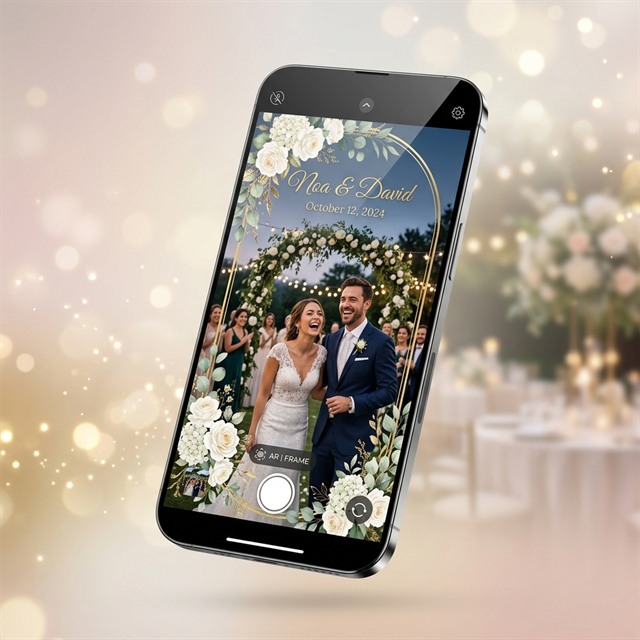
בחבילות פרימיום ומעלה כלולות מסגרות AR מאוירות ומעוצבות בהתאמה אישית שמופיעות בלייב במצלמה, לצד זיהוי פנים וגלריית אירוע משותפת — ישירות מהדפדפן.
כל החבילות כוללות עיצוב בסיסי לקאפה ולפלייר שנשלח במייל. פרימיום ומעלה כוללות גם מסגרות AR מאוירות ומעוצבות בהתאמה אישית שמופיעות בלייב במצלמת הווב-אפ.
פרימיום ומעלה כוללות מסגרות AR מאוירות ומעוצבות בהתאמה אישית שמופיעות בלייב במצלמת הווב-אפ. כל חבילה כוללת עיצוב בסיסי לקאפה ולפלייר שנשלח במייל; עיצוב אישי שלהם ניתן בתוספת תשלום.
Guests scan QR, capture from their phone, and all media appears in a live shared gallery in real time.
Guests scan their face and get a personal gallery with all photos and videos they appear in.
All media stays in an organized gallery link for sharing and browsing after the event.
Adapt the experience to weddings, company events, and celebrations with event photo design.
Works directly in the mobile browser. Guests just scan a QR code — no downloads needed.
Start from the event path closest to your celebration and keep the same SnapTogether URL experience.
האורחים בוחרים עיצוב זמין לתמונות, משתפים רגעים בגלריה החיה ויכולים לחזור לאלבום אחרי החתונה.
A phone-first attraction kids can use instantly without installing an app.
A branded digital experience for photos, friends, and a shared live gallery.
האורחים מצלמים לפי הגדרת האירוע שנבחרה, והגלריה החיה מרכזת את הרגעים המשותפים.
From QR code to a complete digital album in minutes
Guests open the experience from a QR code placed on signs, tables, or screens.
בוחרים עיצוב אישי זמין לתמונות האירוע; המערכת מיישמת אותו אוטומטית על התמונות והסרטונים.
AI face recognition helps each guest find their photos instantly. Download or share anytime.
After the event, the gallery stays available as a digital album for sharing and download.
Choose a package, approve the event design, receive the QR materials, and manage the gallery during or after the event.
Pick the package, event type, event photo design, and optional face recognition.
Use the QR on signs, tables, invitations, or screens so guests can join fast.
Keep the live gallery organized and remove individual photos when needed.
From the guest's phone to the live gallery — this is the experience
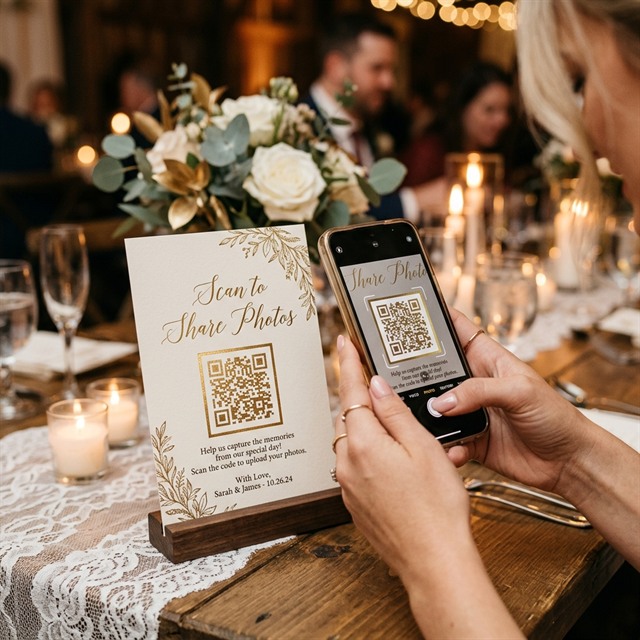
Guests scan the QR code and the camera opens instantly — no app needed
בוחרים עיצוב מתוך האפשרויות הזמינות, והמערכת מיישמת אותו אוטומטית.
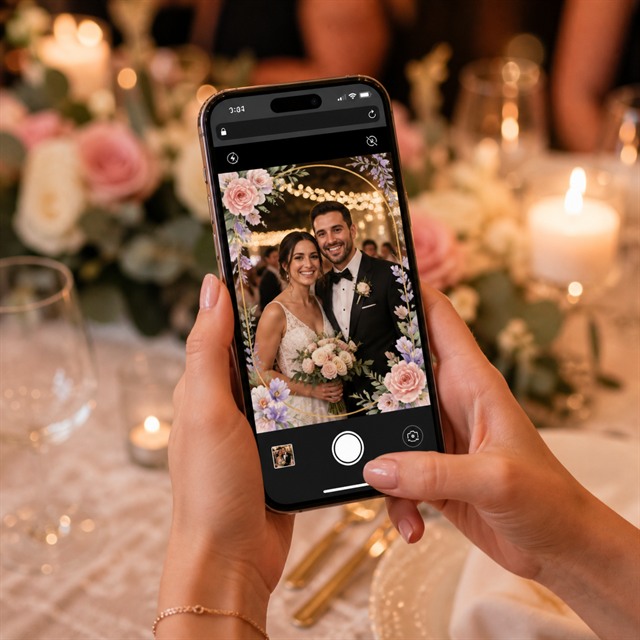
Guests capture in the web app and every photo saves to the shared gallery in real time
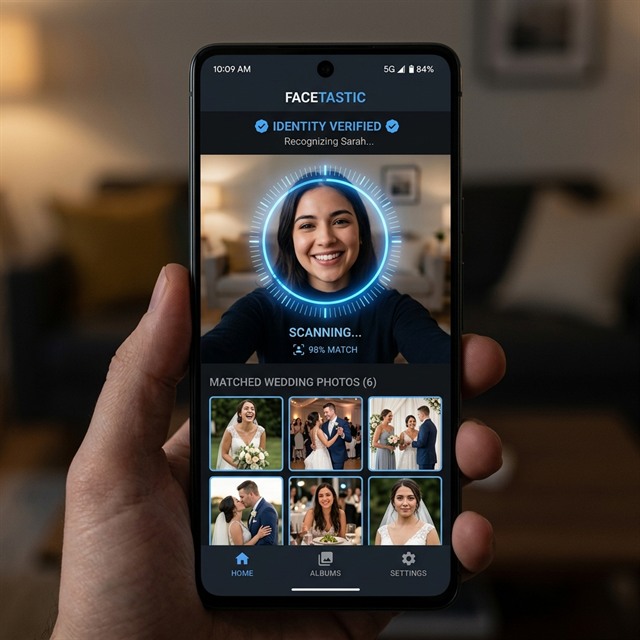
AI face recognition helps each guest find all their photos instantly
Transparent pricing. No hidden fees.
Loading packages...
Media is stored for the event gallery period, event owners can manage content, and guests can request deletion of their own photos.
Read Privacy Policyתשובות מעשיות על הקמה, שימוש אורחים, אחסון, פרטיות והזמנה.
כל החבילות כוללות מצלמת אירוע בדפדפן, גלריה משותפת, אלבום דיגיטלי אחרי האירוע ועיצוב בסיסי לקאפה ולפלייר שנשלח במייל. פרימיום ומעלה כוללות גם מסגרות AR מאוירות ומעוצבות בהתאמה אישית, שמופיעות בלייב במצלמה.
לא. האורחים סורקים QR ופותחים את החוויה ישירות בדפדפן של הטלפון, בלי חנות אפליקציות ובלי התקנה.
מקבלים קישור לאירוע, חומרי QR לשלטים או למסכים, גישה לבחירת העיצוב האישי לתמונות האירוע ומסלול בדיקה לפני שהאורחים מגיעים.
האורחים סורקים QR, מאשרים גישה למצלמה ומצלמים תמונות או סרטונים בדפדפן. בחבילות פרימיום ומעלה מסגרות AR מאוירות ומעוצבות בהתאמה אישית מופיעות בלייב בזמן הצילום.
כן. אפשר לפתוח את הגלריה על מסך באירוע כדי שתמונות וסרטונים חדשים יופיעו בזמן אמת.
אין הגבלת כמות אורחים באף אחת מהחבילות. משך שמירת המדיה והפיצ׳רים הכלולים מופיעים בכרטיס של כל חבילה.
גלריית האירוע נשארת זמינה כאלבום דיגיטלי. כברירת מחדל המדיה נשמרת ל-90 יום, ויש אפשרויות הארכה אם צריך עוד זמן.
מדיית האירוע מופיעה בגלריה של אותו אירוע. בעל האירוע יכול להסיר תמונות, אורחים יכולים לבקש מחיקה של תמונות שלהם, ולא נעשה שימוש שיווקי בלי הסכמה מפורשת.
כאשר הפיצ׳ר פעיל, אורחים יכולים לסרוק את פניהם כדי למצוא תמונות וסרטונים שבהם הם מופיעים. הפיצ׳ר אופציונלי ומנוהל לפי מדיניות הפרטיות.
הזרימה המרכזית היא צילום בדפדפן מהטלפון של כל אורח. אם צריך העלאות ידניות או הוספות אחרי האירוע, ציינו זאת בבקשת ההצעה כדי שנתכנן את ההקמה המתאימה.
פרימיום ומעלה כוללות מסגרות AR מאוירות ומעוצבות בהתאמה אישית שמופיעות בלייב במצלמת הווב-אפ. כל החבילות כוללות עיצוב בסיסי לקאפה ולפלייר שנשלח במייל; עיצוב אישי שלהם ניתן בתוספת תשלום.
שולחים את טופס יצירת הקשר עם פרטי האירוע. הצוות חוזר תוך 24 שעות, והקמה יכולה להיות מוכנה בתוך פחות מ-48 שעות בהתאם לחבילה ולזמינות.
Share the event details and we'll come back with the most relevant setup. Response within 24 hours.


